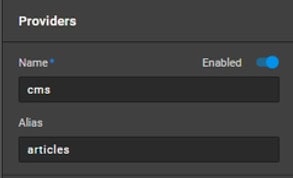
Nilead now supports aliases for widget data providers to improve data mapping consistency. This new feature is especially useful when you reuse widgets as symbols in different contexts. Instead of relying on unstable provider IDs, aliases allow you to create a consistent reference point for your data mapping — saving time, reducing errors, and simplifying complex widget chains.

Access to the Visual Website Builder feature
Familiarity with widgets, symbols, and data providers
Admin or editor role permissions
Widget structure that uses data bindings between multiple providers
When you convert a widget into a symbol, it acts like a reusable component. However, each time you use that symbol elsewhere, its data provider IDs can change — breaking data mappings.
Before Alias:
Data mapping depended on provider IDs → IDs changed across instances → mappings broke.
Now with Alias:
Assign a consistent alias to each provider → all data mappings refer to this alias → mappings stay consistent.
When configuring a data provider inside a widget, you’ll now see an optional Alias field.
Input a unique string identifier (e.g., productList, headerData, testimonialSource).
This alias replaces the provider ID in all data mappings.
Tip: Use lowercase, no spaces, and meaningful names for easier management.
When a widget is saved as a symbol, the assigned alias is preserved.
When the symbol is used in another part of the site, the system maps data using the alias instead of the new provider ID.
Result: Seamless data mapping across pages or environments — no manual fix needed.
If your widget uses a provider chain like:
Provider A → Provider B → Provider C
Your alias strategy depends on where your data mapping happens:
Single Provider Mapping: Assign alias only to Provider C.
Multiple Providers Mapping: Assign aliases to A, B, and C accordingly.
The older transparent provider let users rename providers for mapping clarity. With aliases, this is mostly unnecessary.
Only use transparent providers if:
You have multiple symbols in the same context that pull from the same provider but require different alias names.
You need to aggregate and relabel data from various sources under one unified provider.
This special provider type can:
Combine multiple provider outputs into one.
Use custom key names to organize incoming data.
Still benefit from aliases for clarity and reuse.
1. Do I have to use an alias for every provider?
No. It’s optional — but recommended when using symbols across pages or complex widget structures.
2. Can I have two providers with the same alias?
No. Aliases must be unique within the same context to avoid conflicts.
3. What happens if I forget to assign an alias when converting to a symbol?
The system will fall back to using provider IDs, which may cause mapping issues if reused elsewhere.
4. Can I change the alias later?
Yes, but if it's already referenced in data mapping, you’ll need to update those mappings as well.
5. Do aliases affect performance or data speed?
No. They are purely logical references and do not introduce runtime overhead.