Document Introduction to CSS Selector

Introduction to CSS Selector

Learn how CSS selectors like type, class, ID, and pseudo-classes help you control styling in Nilead’s Visual Editor or when writing custom CSS.

Table of content

TL;DR / Overview

A CSS selector defines which HTML elements a style rule applies to. It's the starting point of any CSS rule. In Nilead, understanding how selectors work helps you apply styles accurately using the Visual Editor or through custom CSS.

Prerequisites

  • Access to a project on Nilead with styling enabled

  • Familiarity with basic HTML elements

  • Optional: Access to the custom code panel for manual CSS injection

Walkthrough

What Is a Selector?

A selector is the part of a CSS rule that targets specific HTML elements. Without a selector, a style has nowhere to apply.

Example:

h1 { color: red; }

In this case, h1 is the selector — it targets all <h1> elements and sets their text color to red.

Types of CSS Selectors

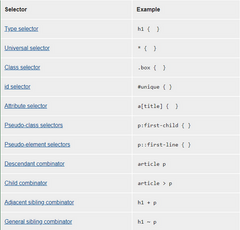
1. Type Selector (element selector)

Targets all instances of a specific HTML tag.

p { font-size: 16px; }

Applies to all <p> tags.

2. Class Selector

Targets elements with a specific class attribute.

.box { background-color: #f0f0f0; }

Applies to any element with class="box".

💡 Tip: Classes are reusable. You can apply the same class to multiple elements.

3. ID Selector

Targets a single element with a specific ID.

#hero { height: 500px; }

Applies only to the element with id="hero".

⚠️ IDs should be unique on each page.

Attribute Selectors

Use these to style elements based on specific attributes.

Examples:

a[title] { text-decoration: underline; } 
a[href="https://example.com"] { color: green; }
  • Targets anchor tags with a title attribute or specific href value.

Pseudo-classes and Pseudo-elements

Apply styles based on element states or parts.

Example:

a:hover { color: blue; }
  • :hover applies styles when a user hovers over a link.

Other common pseudo-classes:

  • :focus – element in focus (e.g., input field)

  • :first-child – first child of a parent

  • :nth-child(n) – nth child (e.g., every 2nd row)

Combinators

Combinators define relationships between elements.

Example:

article > p { font-weight: bold; }
  • Selects only <p> elements that are direct children of <article>

Other combinators:

Symbol

Description

(space)

Descendant selector

>

Direct child selector

+

Adjacent sibling

~

General sibling

css-selector-2


FAQs

1. Can I use multiple selectors in one rule?
Yes, use commas:

h1, h2, h3 { font-family: sans-serif; }

2. What’s the difference between class and ID selectors?
IDs are unique, classes are reusable. Use classes for styling and IDs for anchors or JS hooks.

3. Can I combine selectors?
Yes. For example:

div.box:hover { background: yellow; }

4. Can I write custom CSS in Nilead?
Yes — use the Custom Code Panel or inject via Plugins for global styles.

5. Are pseudo-classes supported in the Visual Editor?
While not directly visible, their effects (like :hover) can be previewed in interactions or via custom CSS.

Discord chat

We're available Monday–Friday, security and critical bug fixes are available 24/7.

Facebook page

Get the latest news and updates regarding Nilead platform and services.